• List of iSCSI Mutual CHAP Posts by OS
  • Tools and Utilities for Windows
  • Unix and Linux Distros

slice2

slice2

Monthly Archives: December 2013

Sniffing Packets on VMware ESXi 5.1 and Viewing the Capture in Wireshark

01 Sunday Dec 2013

Posted by Slice2 in VMware, Wireshark

≈ Leave a comment

Tags

VMware, Wireshark

So you need to sniff packets on ESXi 5x for troubleshooting purposes and you are not sure how to get it done. Hopefully this post will assist you. You can access the ESXI CLI from the console or via Putty/xterm by enabling SSH on the host. I prefer SSH access because the buffers in Putty/xterm make life easier.

You can use Wireshark to read the pcap files. Download and install for your OS in this way:
Windows: http://www.wireshark.org/download.html

Debian based Linux:
> apt-get install wireshark

RPM based Linux:
> yum install wireshark

1) Enable SSH on the host.
a) In vCenter, select the Host > Configuration tab > Security Profile > in the Security Profile section click Properties.
b) Scroll down to SSH and select it, then click Options > Start > OK > OK.
c) Launch an xterm or PuTTY session to the ESXi host and login as root.

2) Determine what VMKernel Ports you have on the host.
> esxcfg-vmknic -l | grep vmk
vmk0  Management Network  IPv4 10.10.10.13 255.255.255.0  10.10.10.255  00:1b:78:e0:2f:ea 1500 65535 true STATIC
vmk1  vMotion and iSCSI   IPv4 10.10.10.22 255.255.255.0  10.10.10.255  00:50:56:6f:ba:f2 1500 65535 true STATIC

2) In this case we have two.  Your production systems should have more.
vmk0 – ESXi management network. The default VMKernel Port created when you install ESXi.
vmk1 – vMotion and iSCSI. This is one I created for my LAB used for vMotion and iSCSI traffic.

3) At its most basic, specify the vmk port number and you see the packets fly by.
> tcpdump-uw -i vmk0
a) to stop, simply press CTRL+C.

Three things you need to know about tcpdump-uw:
a) tcpdump-uw only captures the first 68 bytes of data from a packet. To capture the full packet, use the -s option with a value of 1514 for normal MTU or 9014 for jumbo frames.
b) Also, tcpdump-uw can capture a max of 8138 bytes because of buffer constraints. The -B 9 option increases the buffer allowing the capture of up to 9014 bytes.
c) Captures on the vmkernel interface (vmk) only captures network traffic traversing to and from the vmkernel on that interface. It doesnt capture traffic moving across the Virtual Switch.
d) There are quite a few option for so play around with them.
> tcpdump-uw -?
tcpdump-uw version 4.0.0vmw
libpcap version 1.0.0
Usage: tcpdump-uw [-aAdDefIKlLnNOpqRStuUvxX] [ -B size ] [ -c count ]
[ -C file_size ] [ -E algo:secret ] [ -F file ] [ -G seconds ]
[ -i interface ] [ -M secret ] [ -r file ]
[ -s snaplen ] [ -T type ] [ -w file ] [ -W filecount ]
[ -y datalinktype ] [ -z command ] [ -Z user ]
[ expression ]

For example, for default MTU:
> tcpdump-uw -i vmk0 -s 1514
For Jumbo Frames:
> tcpdump-uw -i vmk0 -s 9014 -B 9

4) A few examples to get you started.
a) Dump packets on vmk0 with default MTU very verbose output showing only DNS packets (port 54).
> tcpdump-uw -i vmk0 -s 1514 -vvv port 53

b) Same as above except show NTP packets.
> tcpdump-uw -i vmk0 -s 1514 -vvv port 123

c) Is vCenter communicating properly with the ESXi host?  
> tcpdump-uw -i vmk0 -s 1514 -vvv port 902

d) Filter by transport type – TCP or UDP.
> tcpdump-uw -i vmk0 -s 1514 udp
> tcpdump-uw -i vmk0 -s 1514 tcp

e) Filter for ARP packets.
> tcpdump-uw -i vmk0 -s 1514 udp | grep ARP

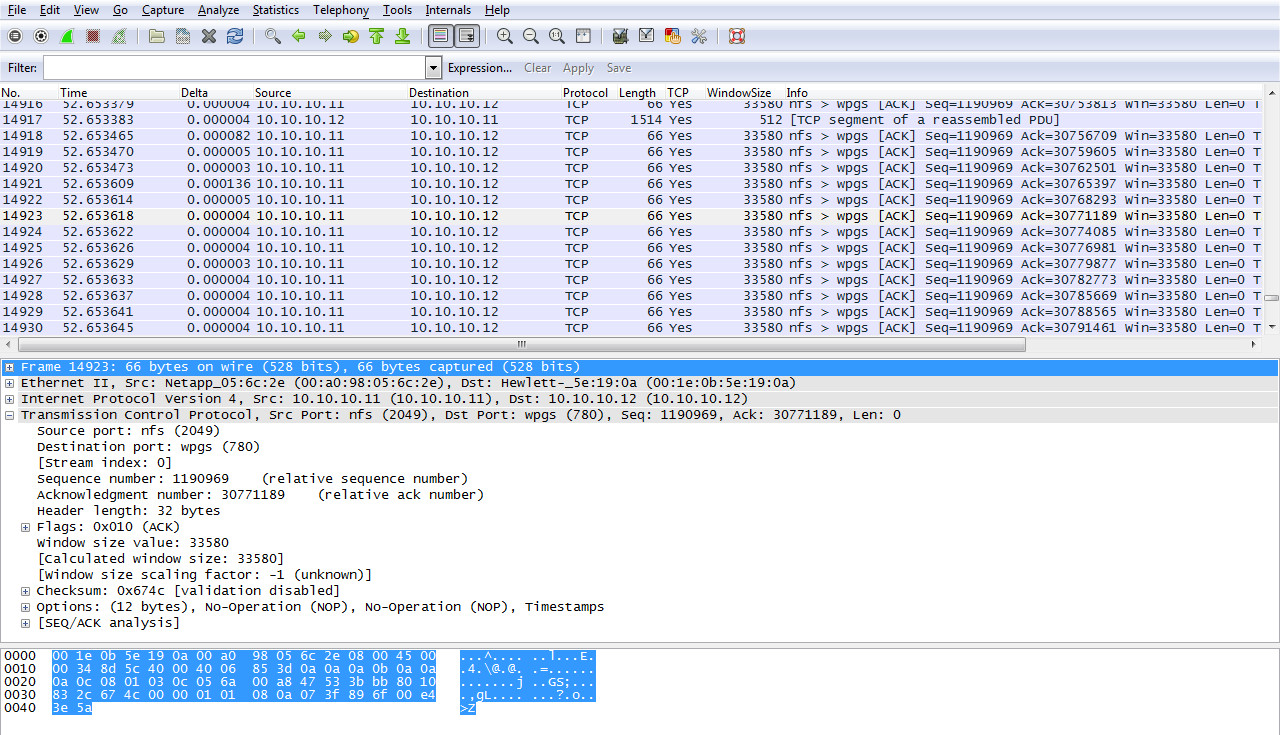
5) You can dump the traffic to a pcap file and open it with Wireshark. Before you start the capture, change directories so you can easily recover the pcap file from the datastore in vCenter.

> cd /vmfs/volumes/datastore1
> tcpdump-uw -i vmk0 -s 1514 -w esxihost01.pcap
> When ready to stop capturing packets, press CTRL+C
a) When done, in vCenter select the ESXi host you were sniffing packets on, then click the Configuration tab > Storage.
b) Right-click datastore1 (or the datastore were your pcap file is) and select Browse datastore.
c) Right-click the esxihost01.pcap file > select Download, select a location and click OK.
d) Double-click the file and it will open in Wireshark.esxipacketsniff
Newer posts →

Follow Blog via Email

Enter your email address to follow this blog and receive notifications of new posts by email.

Recent Posts

  • Patch Alma Linux 8.7 on an Offline or Air-Gapped System
  • HOWTO Remove /home logical volume and add that space to the root partition
  • Patch Rocky Linux 8.6 on an Offline or Air-Gapped System
  • HOWTO Install the Splunk Universal Forwarder on FreeBSD
  • HOWTO install a Splunk Universal Forwarder on Solaris 11 SPARC and x64 Using pkg(p5p) and tar
  • HOWTO install a Splunk Universal Forwarder on Solaris 10 SPARC and x64 Using pkgadd and tar
  • Recover Files from a Windows NTFS partition using Linux based SystemRescue
  • Sysmon Event ID 1 Process Creation rules for Splunk Universal Forwarder and McAfee All Access
  • Upgrading CentOS 7.2003 to 7.2009 on an Offline or Air-Gapped System
  • HOWTO Easily Resize the Default LVM Volume on Ubuntu 18.04
  • Create a Docker Container for your Cisco ESA, SMA or WSA Offline Content Updates
  • Apply the Mozilla Firefox STIG to Firefox on Ubuntu Linux 18.04
  • Dynamically Resize Those Tiny BlackArch Linux Terminals and Add a Scrollbar
  • Kali Linux OVA for Air-Gapped Use Build Process
  • HOWTO install the XFCE 4 Desktop on NetBSD 8.1
  • Build a Kali Linux ISO with the latest OS patches and packages
  • HOWTO quickly STIG Firefox 59.01
  • HOWTO mount a Synology NAS SMB share on Linux with SMBv1 disabled
  • Howto safely delete the WSUS WID on Windows 2012R2
  • HOWTO quickly STIG Firefox 45.0.1
  • Completing the vSphere vCenter Appliance Hardening Process
  • HOWTO install the XFCE 4.12 Desktop on NetBSD 7
  • Enabling TLS 1.2 on the Splunk 6.2x Console and Forwarders using Openssl and self signed certs.
  • HOWTO enable SSH on a Cisco ASA running 9.1.x
  • Apply a Windows 2012 R2 Domain GPO to a standalone Windows 2012 R2 server
  • Enable legacy SSL and Java SSL support in your browser for those old, crusty websites
  • HOWTO update FreeBSD 10.1 to the latest 11-current release
  • HOWTO Secure iSCSI Luns Between FreeBSD 10.1 and NetApp Storage with Mutual CHAP
  • HOWTO install the XFCE 4 Desktop on NetBSD 6.1.5
  • HOWTO Secure iSCSI Luns Between Ubuntu Server 14.10 and NetApp Storage with Mutual CHAP

Categories

  • Cisco (2)
  • ESXi (4)
  • FreeBSD (2)
  • HP (5)
  • iSCSI (12)
  • Linux (31)
  • Nessus (3)
  • NetApp (31)
  • NetBSD (10)
  • Oracle (9)
  • Security (48)
  • Solaris (9)
  • Splunk (5)
  • VMware (19)
  • Windows (20)
  • Wireshark (4)
  • XFCE (3)

Archives

  • February 2023
  • August 2022
  • July 2022
  • April 2022
  • March 2022
  • February 2022
  • January 2022
  • November 2021
  • January 2021
  • December 2020
  • November 2020
  • August 2020
  • May 2020
  • September 2019
  • August 2019
  • March 2018
  • November 2016
  • March 2016
  • January 2016
  • November 2015
  • July 2015
  • June 2015
  • February 2015
  • January 2015
  • December 2014
  • November 2014
  • October 2014
  • September 2014
  • August 2014
  • July 2014
  • May 2014
  • April 2014
  • March 2014
  • February 2014
  • January 2014
  • December 2013
  • November 2013
  • October 2013
  • September 2013
  • August 2013
  • July 2013
  • June 2013
  • May 2013
  • April 2013
  • March 2013

Blogroll

  • Adobe Security Bulletins
  • CentOS Blog
  • Cisco Security Blog
  • CSO Magazine
  • DHS National Vulnerability Database
  • Eric Sloof's NTPRO
  • HT SSL Tests
  • Intel Corp Security Advisories
  • Internet Usage World Stats
  • Kali Linux Blog
  • Linux Mint Blog
  • Meltdown and Spectre
  • Microsoft Security Blog
  • Microsoft Security Intelligence Report
  • Microsoft Security Research & Defense
  • Microsoft Security Response Center
  • MITRE CVE Site
  • NetApp Blogs
  • NetBSD Blog
  • Oracle OTN Security
  • Oracle Security Blog
  • PacketStorm
  • Redhat Security Blog
  • SC Magazine
  • Shodan Search Engine
  • US-CERT Alerts
  • US-CERT Bulletins
  • US-CERT Vulnerability Notes KB
  • VMware Blogs
  • VMware Security Advisories

Category Cloud

Cisco ESXi FreeBSD HP iSCSI Linux Nessus NetApp NetBSD Oracle Security Solaris Splunk VMware Windows Wireshark XFCE

Follow Blog via Email

Enter your email address to follow this blog and receive notifications of new posts by email.

Join 41 other subscribers

Powered by WordPress.com.

Loading Comments...